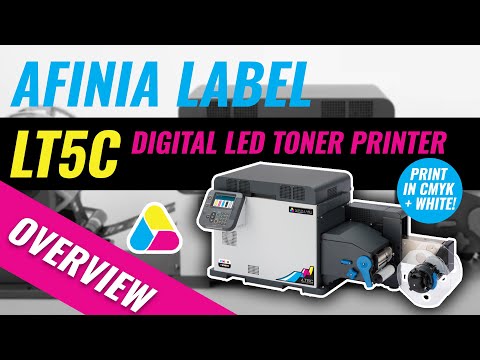
LT5C CMYK + White Label Printer


Top Uses & Applications
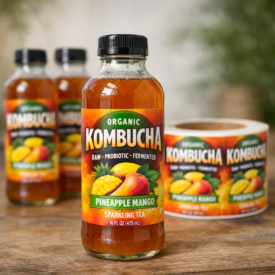



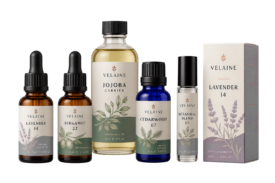
Print with white on standard or specialty media
The LT5C CMYK + white label printer offers professional five-color output for a wide variety of markets. Whether it’s high-durability labels, freezer and cold-storage labels, food and beverages, or household goods—the LT5C from Afinia Label can deliver that and more.
- Print with white
- Works with foils and specialty media
- LED dry toner technology
- Fully-waterproof print durability
 5th Station White Toner
The fifth station allows for white printing, making it easy to print brilliant designs on transparent and dark materials. This feature gives users the ability to reach a wider range of markets and applications that other label printers simply cannot serve.
Digital LED Print Technology & Substrate Capabilities
A low fusing temperature gives the LT5C unrivaled media compatibility—especially when handling heat-sensitive synthetics and films. This LED-based technology opens the door to a range of substrates that other label printers simply can’t handle. Dry toner technology gives users the ability to use uncoated and flood-coated stocks also provides further advantage for printers looking to reduce overall cost per label.
Accessories Options
Inline and offline options are available to perform tasks such as slitting and removing the waste matrix from printed rolls.
Media Handling
Fitting rolls ranging from 1″-5.1″ wide with a maximum outside diameter of 8″, the LT5C gives users the versatility to run a variety of label sizes. Two types of sensors are used to detect printing position, Black Mark and Gap, making it easy to run both continuous and die-cut media. The automatic cutter ensures accurate end-of-job cutting, enabling users to print one or many labels quickly and efficiently.
Usability
The LT5C is intuitive and simple to install, requiring minimal training or technical skills. The simple desktop configuration allows for easy consumable and parts access. Rolls of different types can quickly be exchanged, and consumables have a high capacity for extended printing. The 4.3″ LCD color display panel and paper handling guidance makes it easy to feed and print labels on demand.
The Perfect Companion
Labels printed on the LT5C can be cut to any size and shape from continuous (uncut) media on the DLF-140s Tabletop Digital Label Finisher. It’s all done digitally through a simple cut shape you place in a pdf file—no need for expensive dies or tooling, machinery, or wait times. The computer tells the machine where to cut and how many labels to produce, so short run label jobs can be completed easily and quickly. When finishing labels digitally, lamination can also be applied for aesthetic, tactile, and durability purposes.

Printing Method | Digital 5 LED Full-color Electrophotographic Printing Method |
|---|---|
| Media Format | Roll |
| Media Type | Plain Paper, Film, Plain Paper Label, Glossy Paper Label, Film Label, Synthetic paper Label |
| Media Width | 1.17" - 5.12" (29.64mm - 130.0mm) |
| Media Thickness | 0.003" - 0.0098" (0.076mm - 0.25mm |
| Label Length | 0.5" - 52" (12.7mm - 1,320.8mm) |
| Label Width | 1" - 4.95" (25.4mm - 125.76mm) |
| Media Detection | Gap Black Mark (printed on back of liner) None |
| Maximum roll diameter | 8" (203.2mm) |
| Core Inner Diameter | 3" (76.2mm) |
| Roll Wind Direction | Face-out, Face-in |
| Print Width | 4.95" (125.76mm) |
| Minimum Print Margin | Top: 0.083" (2.12mm) Bottom: 0.083" (2.12mm) Right: 0.083" (2.12mm) Left: 0.083" (2.12mm) |
| Cuttable Media Length | Min. 4" (101.6mm) |
| Print Resolution | 1200 x 1200 dpi 600 x 600 dpi |
| Print Speed | Max. 6ips (152.4mm/s) |
| Interface | 1000BASE-T/100BASE-TX/10BASE-T, USB 2.0 (High Speed) |
| Protocol | TCP/IP |
| Printer Language | PCL 5c emulation, PCL 6 (XL) emulation, Adobe PostScript 3 |
| Operating Systems | Windows 10/11, 64-bit, Intel/AMD x86/x64 only. ARM/Snapdragon not supported. |
| Processor | ARM CPU 1.2 GHz |
| Memory (Std./Max.) | 2048 MB / 2048 MB |
| Hard Disk Drive | 250 GB |
| Font | Adobe PostScript 136 fonts, PCL emulation 81 scalable fonts, 4 bitmap fonts |
| Media Sensors | Position adjustable Transmission Gap Sensor Position adjustable Reflective Black Mark (printed on back of liner) Sensor |
| Auto Cutter | Rotary blade full cut |
| Dimensions(WxDxH) | 40.95" x 18.78" x 17.36" (1,040 x 477 x 441 mm) |
| Weight | 136 lbs (61 kg - 62 kg) |
| Operating Environment | Operating: 50 - 86°F (10 - 30 °C), 20 - 70 %RH Storage: 32 - 109.4°F (0 - 43 °C), 10 - 90 %RH No condensation |
| Power Consumption | Operating: Max. 1,200W / Ave. 740W Idle: 27W Power Save: < 25.0W |
LT5C — General
What is the Afinia Label LT5C?
Who is the LT5C best suited for?
What monthly print volume is the LT5C designed for?
What makes the LT5C different from Afinia's inkjet label printers?
LT5C — White Toner, Print Quality and Durability
Can the LT5C print white?
Can the LT5C print white underneath color?
Can the LT5C print using only white toner?
Are labels printed with the LT5C water-resistant?
How fast does the LT5C print?
What is the maximum print resolution?
What is the maximum print width?
LT5C — Media and Label Sizes
What types of label materials can the LT5C print on?
Can the LT5C print on clear, colored, and specialty materials?
What label sizes does the LT5C support?
What media thickness does the LT5C support?
Can the LT5C print die-cut and continuous labels?
What size label rolls does the LT5C accept?
Can the LT5C use face-in and face-out label rolls?
LT5C — Media Handling and Finishing
Does the LT5C include an automatic cutter?
Are roll-to-roll and finishing accessories available for the LT5C?
Can LT5C labels be digitally finished into custom shapes?
LT5C — Software, Connectivity and Operation
What connectivity options does the LT5C offer?
What operating systems are supported by the LT5C?
Does the LT5C have a built-in display?
Can the LT5C reduce toner usage for certain print jobs?
How can I determine whether the LT5C is right for my application?
Talk to a Label Printing Specialist
Tell us about your application, label size, and monthly volume. We’ll help you choose the right printer, media, and finishing workflow for your business.
- Get pricing and product recommendations
- Ask about label materials and compatibility
- Find the right setup for your production volume